There are many articles to mount sshfs using autofs, but most of them use "empty" passphrase. I come up with a way to enable passphrase. Here is a memo for myself in the future.
2019年12月7日土曜日

2019年2月9日土曜日
Building ROCm on Gentoo
ROCm
is a platform to utilze AMD GPU for computing.The most of the
components are open source. HIP which is a part of ROCm allows to
compile CUDA source.
2018年6月12日火曜日
A note to configure In-wall WiFi Accesspoint WAP-102S
 I purchased 5 of In-Wall access point WAP-102S from PG-Direct. As of today, it is only 680JPY. I bought it by 980JPY :-(
According to the article, the AP does not offer any setting GUI. It only works as WiFi router, it can not be an access point. But the catalogue says it is configurable.
After I tried, I could configure it to AP.
2017年7月4日火曜日
DDNS Site-to-Site IPsec VPN by Ubiquiti Networks EdgeRouter ER-X
I've been using ER-X from Ubiquiti Networks for more than half year. It is covered with metal chassis and its functionality is as solid as it looks, though it is cheaper than $50. One is used in my house and the other is used in my parents' house.
Now it is time to establish site-to-site IPsec VPN. Google says that site-to-site IPsec with DDNS is troublesome.
To be honest, I have 3 more ER-X for trying this site-to-site VPN without breaking existing internet connection, so I have 5 ER-X in total😀. The ER-X on the left of the picture emulates ISP and the internet, it offers PPPoE service and DNS. The two ER-X on the right correspond to routers in my home and my parents' home. After this experiment, some will be sent to my brothers.

As far as I studied from many posts, using pre-shared-key (PSK) for DDNS is the source of trouble. Using PSK is only good when IP address is used to specify the remote site.
When one needs to establish site-to-site VPN and both side use DDNS, RSA or x509 look promising.
The post on the Ubiquiti forum looks attractive to me, but the post uses VTI and the setting itself was not sufficient for my case.
Here is what I found and working on my test bench. Note that firmware version is 1.9.1.1.
site0 local network:192.168.20.0/24, DDNS of WAN:site0.example.net
site1 local network:192.168.30.0/24, DDNS of WAN:site1.example.net
On site1,
On site0,
Notice that "WAN_LOCAL" and "rule 60" depend on your configuration. So adding via GUI is much easier.
On site1,
The setting in brown color is what I found necessary to connect each other.
Good luck!
Now it is time to establish site-to-site IPsec VPN. Google says that site-to-site IPsec with DDNS is troublesome.
To be honest, I have 3 more ER-X for trying this site-to-site VPN without breaking existing internet connection, so I have 5 ER-X in total😀. The ER-X on the left of the picture emulates ISP and the internet, it offers PPPoE service and DNS. The two ER-X on the right correspond to routers in my home and my parents' home. After this experiment, some will be sent to my brothers.

As far as I studied from many posts, using pre-shared-key (PSK) for DDNS is the source of trouble. Using PSK is only good when IP address is used to specify the remote site.
When one needs to establish site-to-site VPN and both side use DDNS, RSA or x509 look promising.
The post on the Ubiquiti forum looks attractive to me, but the post uses VTI and the setting itself was not sufficient for my case.
Here is what I found and working on my test bench. Note that firmware version is 1.9.1.1.
site0 local network:192.168.20.0/24, DDNS of WAN:site0.example.net
site1 local network:192.168.30.0/24, DDNS of WAN:site1.example.net
Preparing RSA key on the both side
In CLI of both site, run the following command to generate RSA key.You need to copy the SOME_VERY_LONG_STRING to your local text file.ubnt@site0:~$ generate vpn rsa-key bits 4096 Generating rsa-key to /config/ipsec.d/rsa-keys/localhost.key Your new local RSA key has been generated The public portion of the key is: SOME_VERY_LONG_STRING
Register the public key of the counter part
On site0,configure
set vpn rsa-keys local-key file /config/ipsec.d/rsa-keys/localhost.key
set vpn rsa-keys rsa-key-name site1 rsa-key SOME_VERY_LONG_STRING_SHOWN_IN_SITE1
commit
On site1,
configure
set vpn rsa-keys local-key file /config/ipsec.d/rsa-keys/localhost.key
set vpn rsa-keys rsa-key-name site0 rsa-key SOME_VERY_LONG_STRING_SHOWN_IN_SITE0
commit
Open Firewall for remote site
Surprisingly, packets from the remote site come via pppoe0 (or whatever an interface you use to connect the internet). Usually an interface which is used for the internet connection has the most strict rules, so a rule to accept such packet is necessary. (configure, commit, and save are omitted in the following lists).On site0,
set firewall name WAN_LOCAL rule 60 action acceptOn site1,
set firewall name WAN_LOCAL rule 60 description FromSite1
set firewall name WAN_LOCAL rule 60 destination address 192.168.20.0/24
set firewall name WAN_LOCAL rule 60 log disable
set firewall name WAN_LOCAL rule 60 protocol all
set firewall name WAN_LOCAL rule 60 source address 192.168.30.0/24
set firewall name WAN_LOCAL rule 60 action accept
set firewall name WAN_LOCAL rule 60 description FromSite0
set firewall name WAN_LOCAL rule 60 destination address 192.168.30.0/24
set firewall name WAN_LOCAL rule 60 log disable
set firewall name WAN_LOCAL rule 60 protocol all
set firewall name WAN_LOCAL rule 60 source address 192.168.20.0/24
Notice that "WAN_LOCAL" and "rule 60" depend on your configuration. So adding via GUI is much easier.
Configure other VPN settings
On site0set vpn ipsec auto-firewall-nat-exclude enable
set vpn ipsec esp-group FOO0 compression disable
set vpn ipsec esp-group FOO0 lifetime 3600
set vpn ipsec esp-group FOO0 mode tunnel
set vpn ipsec esp-group FOO0 pfs enable
set vpn ipsec esp-group FOO0 proposal 1 encryption aes128
set vpn ipsec esp-group FOO0 proposal 1 hash sha1
set vpn ipsec ike-group FOO0 ikev2-reauth no
set vpn ipsec ike-group FOO0 key-exchange ikev1
set vpn ipsec ike-group FOO0 lifetime 28800
set vpn ipsec ike-group FOO0 proposal 1 dh-group 14
set vpn ipsec ike-group FOO0 proposal 1 encryption aes128
set vpn ipsec ike-group FOO0 proposal 1 hash sha1
set vpn ipsec site-to-site peer site1.example.com authentication id site0
set vpn ipsec site-to-site peer site1.example.com authentication mode rsa
set vpn ipsec site-to-site peer site1.example.com authentication remote-id site1
set vpn ipsec site-to-site peer site1.example.com authentication rsa-key-name site1
set vpn ipsec site-to-site peer site1.example.com connection-type initiate
set vpn ipsec site-to-site peer site1.example.com description ToSite1
set vpn ipsec site-to-site peer site1.example.com ike-group FOO0
set vpn ipsec site-to-site peer site1.example.com ikev2-reauth inherit
set vpn ipsec site-to-site peer site1.example.com local-address any
set vpn ipsec site-to-site peer site1.example.com tunnel 1 allow-nat-networks disable
set vpn ipsec site-to-site peer site1.example.com tunnel 1 allow-public-networks disable
set vpn ipsec site-to-site peer site1.example.com tunnel 1 esp-group FOO0
set vpn ipsec site-to-site peer site1.example.com tunnel 1 local prefix 192.168.20.0/24
set vpn ipsec site-to-site peer site1.example.com tunnel 1 remote prefix 192.168.30.0/24
On site1,
set vpn ipsec auto-firewall-nat-exclude enable
set vpn ipsec esp-group FOO0 compression disable
set vpn ipsec esp-group FOO0 lifetime 3600
set vpn ipsec esp-group FOO0 mode tunnel
set vpn ipsec esp-group FOO0 pfs enable
set vpn ipsec esp-group FOO0 proposal 1 encryption aes128
set vpn ipsec esp-group FOO0 proposal 1 hash sha1
set vpn ipsec ike-group FOO0 ikev2-reauth no
set vpn ipsec ike-group FOO0 key-exchange ikev1
set vpn ipsec ike-group FOO0 lifetime 28800
set vpn ipsec ike-group FOO0 proposal 1 dh-group 14
set vpn ipsec ike-group FOO0 proposal 1 encryption aes128
set vpn ipsec ike-group FOO0 proposal 1 hash sha1
set vpn ipsec site-to-site peer site0.example.com authentication id site1
set vpn ipsec site-to-site peer site0.example.com authentication mode rsa
set vpn ipsec site-to-site peer site0.example.com authentication remote-id site0
set vpn ipsec site-to-site peer site0.example.com authentication rsa-key-name site0
set vpn ipsec site-to-site peer site0.example.com connection-type initiate
set vpn ipsec site-to-site peer site0.example.com description ToSite0
set vpn ipsec site-to-site peer site0.example.com ike-group FOO0
set vpn ipsec site-to-site peer site0.example.com ikev2-reauth inherit
set vpn ipsec site-to-site peer site0.example.com local-address any
set vpn ipsec site-to-site peer site0.example.com tunnel 1 allow-nat-networks disable
set vpn ipsec site-to-site peer site0.example.com tunnel 1 allow-public-networks disable
set vpn ipsec site-to-site peer site0.example.com tunnel 1 esp-group FOO0
set vpn ipsec site-to-site peer site0.example.com tunnel 1 local prefix 192.168.30.0/24
set vpn ipsec site-to-site peer site0.example.com tunnel 1 remote prefix 192.168.20.0/24
The setting in brown color is what I found necessary to connect each other.
Good luck!
2017年7月2日日曜日
DNS Hosting and DDNS of changeip.com
Recently I registered some domain and want to use it for Dynamic DNS.
I googled for DDNS services which allows to use my own domain.
Some service costs more than $10 / month, which seems to be for business purpose.
I found ChangeIP offers DNS hosting for $9 / year and DDNS for $6 / year which is cheapest service I could find for using my own domain.
I hit a trouble that my domain was not shown on their WEB control panel even after paid fee and delegated authority to DNS serves of changeip.com.
I asked via their support ticket, they answered promptly and fixed my problem.
Of course no issue is better, but still quick and correct support is impressive.
I googled for DDNS services which allows to use my own domain.
Some service costs more than $10 / month, which seems to be for business purpose.
I found ChangeIP offers DNS hosting for $9 / year and DDNS for $6 / year which is cheapest service I could find for using my own domain.
I hit a trouble that my domain was not shown on their WEB control panel even after paid fee and delegated authority to DNS serves of changeip.com.
I asked via their support ticket, they answered promptly and fixed my problem.
Of course no issue is better, but still quick and correct support is impressive.
Overall
I'm satisfied with the service. I hope more people use the service, then their business succeeds and I can keep using the service in the good price 😄Pros:
- Competitive price ($9/year for DNS hosting and $6/year for DDNS of the domain)
- Rapid DDNS update (TTL is 30sec which I've never seen in free DDNS services)
- Quick support
- Useful knowledge base
Cons:
- Wizard or easy tutorial for initial setting does not exist
- Knowledge base is good, but standard manual is helpful.
2016年9月19日月曜日
RISC-V on JCPU
RISC-V is attracting attention from uses recently especially after acquisition of ARM by Softbank.
Specification of RISC-V is well documented. I found its ISA is very simple and suitable for high performance micro architecture; no flag is necessary for conditional branch.
I saw "Hello world" of RISC-V on JCPU within a day!. Although only user mode 32bit integer instructions are implemented, I don't see any difficulty to support further instructions.
The biggest hurdle I'm struggling is version up of LLVM. Afte LLVM-3.6, OldJIT is removed and only MCJIT is available. The MCJIT does not allow adding function to module once a module is translated. It is crucial for my use. I need to build module for each code block of target program.
The change takes time, which is not available for me ;-)
During writing a test bench of RISC-V, I found very easy-to-use elf load library ELFIO. It really is handy because header-only style and written in C++.
Specification of RISC-V is well documented. I found its ISA is very simple and suitable for high performance micro architecture; no flag is necessary for conditional branch.
I saw "Hello world" of RISC-V on JCPU within a day!. Although only user mode 32bit integer instructions are implemented, I don't see any difficulty to support further instructions.
The biggest hurdle I'm struggling is version up of LLVM. Afte LLVM-3.6, OldJIT is removed and only MCJIT is available. The MCJIT does not allow adding function to module once a module is translated. It is crucial for my use. I need to build module for each code block of target program.
The change takes time, which is not available for me ;-)
During writing a test bench of RISC-V, I found very easy-to-use elf load library ELFIO. It really is handy because header-only style and written in C++.
2014年11月17日月曜日
When zpool create command fails
When try to create pool on whole disk but a partition, zpool command automatically creates partition.
But sometimes the command fails and emits the following error message.
As described in ArchWiki, that is because udev fails to create the device file within 1 second.
The ArchWiki proposes to slow down the disk by parallel read.
I found another way which is much stable.
strace command traps syscalls and dump the parameters of syscalls to stderr.
cstream command lets you limit throughput.
So limit the stderr by cstream slows down the zpool.
If the command is too slow, then increase the throughput to 8K or 16K.
But sometimes the command fails and emits the following error message.
the kernel failed to rescan the partition table: 16
cannot label 'sdc': try using parted(8) and then provide a specific slice: -1
As described in ArchWiki, that is because udev fails to create the device file within 1 second.
The ArchWiki proposes to slow down the disk by parallel read.
I found another way which is much stable.
strace command traps syscalls and dump the parameters of syscalls to stderr.
cstream command lets you limit throughput.
So limit the stderr by cstream slows down the zpool.
strace zpool create /dev/sda /dev/sdb tank |& cstream -b 64 -t 2048
If the command is too slow, then increase the throughput to 8K or 16K.
2014年10月24日金曜日
SoftEther VPN on Gentoo
SoftEther VPN is an opensource VPN client/server software, which supports multiple vpn protocols like their own protocol, L2TP/IPsec, OpenVPN, and MS-SSTP. Its client and server software runs on multiple platform including Window, Linux and BSD. Simply saying it's awesome.
Maybe because the software is originally developed on Windows, some part of its behavior is not unix-style.
And no ebuild in the gentoo portage exists. That's why I make my portage overlay.
It is available at my github repository.
The ebuild includes several patches that I think not appropriate to merged in mainline.
# emerge softether-vpn
# rc-update add vpnserver
# /etc/init.d/vpnserver start
Then configure the vpnserver. I recommend to use Server Management program on windows to configure the server.
Maybe because the software is originally developed on Windows, some part of its behavior is not unix-style.
- logs are saved in the same directory as the binary locates
- config file is saved in the same directory as the binary locates
And no ebuild in the gentoo portage exists. That's why I make my portage overlay.
It is available at my github repository.
The ebuild includes several patches that I think not appropriate to merged in mainline.
- pid file and log file are saved in /var/run and /var/log/softeher respectively.
- disable override /proc/sys/kernel/threads-max setting
- activate all features including X.509 authentication that are disabled on original source
How to use my overlay:
- emerge layman
- enable the line of "overlay_defs" in /etc/layman/layman.cfg
- wget https://raw.githubusercontent.com/yTakatsukasa/misc/master/layman/yutetsu.xml -O /etc/layman/overlays/yutetsu.xml
- layman -a yutetsu
How to install softether-vpn
After my overlay is enabled,# emerge softether-vpn
# rc-update add vpnserver
# /etc/init.d/vpnserver start
Then configure the vpnserver. I recommend to use Server Management program on windows to configure the server.
2014年9月25日木曜日
Changing the permission of /dev/nvidia* on Gentoo Linux
To use CUDA on Gentoo, just emerge nvvidia-cuda-sdk is sufficient.
After installing the driver and sdk, /dev/nvidia* will be found.
These device files has 660 permission and belong to video group.
So if users are a member of video group, no problem.
If you want to use the device file from other groups, you have to change the permission.
Here is what I did.
1) edit /etc/modprobe.d/nvidia.conf
change the line starts with "options nvidia NVreg_DeviceFileMode=", from NVreg_DeviceFileMode=432 to NVreg_DeviceFileMode=0666
2) chmod +x /opt/bin/nvidia-modprobe
3) reboot
Then you will find /dev/nvidia* have permissioin 666.
After installing the driver and sdk, /dev/nvidia* will be found.
These device files has 660 permission and belong to video group.
So if users are a member of video group, no problem.
If you want to use the device file from other groups, you have to change the permission.
Here is what I did.
1) edit /etc/modprobe.d/nvidia.conf
change the line starts with "options nvidia NVreg_DeviceFileMode=", from NVreg_DeviceFileMode=432 to NVreg_DeviceFileMode=0666
2) chmod +x /opt/bin/nvidia-modprobe
3) reboot
Then you will find /dev/nvidia* have permissioin 666.
2013年10月10日木曜日
PATCH for SystemC-2.3 to keep the module hierarchy in VCD
As I have posted to SystemC Forum I wrote a small patch to keep the module hierarchy in VCD.
The patch modifies a PoC simulator to treat signal name as a dot-separated path.
VCD Hierarchy Manipulator is no more necessary.
If you want to disable this feature, set an environmental variable SC_VCD_NO_HIERARCHY.
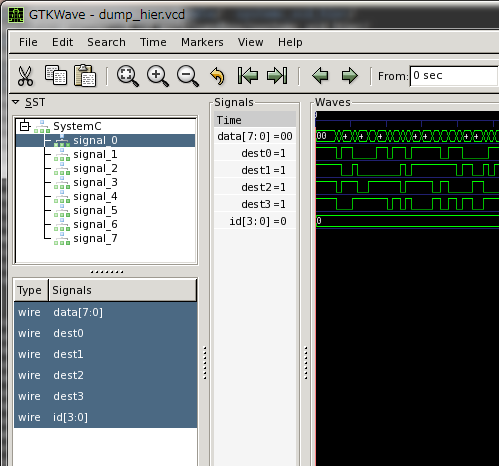
The patch modifies a PoC simulator to treat signal name as a dot-separated path.
VCD Hierarchy Manipulator is no more necessary.
How to get the patch
Please see my github page or simply wget it.How to apply
% tar zxvf systemc-2.3.0.tgz
% cd systemc-2.3.0
% patch -p0 <  ../sc_vcd_trace.patch
% ./configure --any-options
% make
% make install
How to Use
No need to modify the SystemC model. All you need to do is just rebuild your design with the patched systemc library. You will get the VCD as a following screen shot.If you want to disable this feature, set an environmental variable SC_VCD_NO_HIERARCHY.
Feedbacks
I only tested with a small example. Any feedback is welcome.2013年7月29日月曜日
OpenRISC toolchain
Toolchain for OpenRISC cannot be built with the mainline source code. It was difficult for me to find the right way from openrisc web site.
After a couple of days of crawling, I found a repository maintained by Kevin Mehall.
It works perfectly, and its good point is gdb is also maintained.
If all libraries(GMP, MPFR and MPC) to build GCC have already been installed, simply do as following.
After a couple of days of crawling, I found a repository maintained by Kevin Mehall.
It works perfectly, and its good point is gdb is also maintained.
If all libraries(GMP, MPFR and MPC) to build GCC have already been installed, simply do as following.
% git clone https://github.com/kevinmehall/openrisc-tools-build
% cd openrisc-tools-build
% git submodule update --init
% make -j3 PREFIX=
I wanted to build them on CentOS5.x machine and these libraries are not installed by default.
I wrote a preparation script to download and build these libraries.
These libraries are built as a static library, so setting LD_LIBRARY_PATH is not required.
If you faced the same problem, please try the following procedure.
% git clone https://github.com/kevinmehall/openrisc-tools-build
% cd openrisc-tools-build
% git submodule update --init
% wget https://raw.github.com/yTakatsukasa/misc/master/openrisc_toolchain/toolchain.patch -O - | patch -p1
% bash ./prepare.sh
% make -j3 PREFIX=
Note that this patch disables openOCD. If you need openOCD, add openOCD to all: in Makefile.
2013年6月25日火曜日
SystemC-AMS 1.0 with clang
On some system, linking with libsystemc-ams.a compiled with clang may cause multiple definitions. In that case, systemc-ams must be compiled with
cd systemcams-1.0
./configure --with-systemc=/your/systemc/path
make CC="clang -fgnu89-inline"
make install
configure script ignores environmental variable CFLAGS, so -fgnu89-inline option must be specified during make.
gnu89 and C99 have several differences. The biggest one is a function with 'extern inline'.
In gnu89, functions with 'extern inline' are not necessarily compiled to normal non-inlined function.
In C99, such functions must be also compiled to a normal non-inlined function.
Source code which is expected to be compiled with gnu89 may cause link error of multiple definitions for this case.
If you use inline function in C, use 'static inline'. Its meaning is same for both C99 and gnu89.
-fgnu89-inline option.
Howto
tar zxvf systemcams-1.0.tar.gz
cd systemcams-1.0
./configure --with-systemc=/your/systemc/path
make CC="clang -fgnu89-inline"
make install
configure script ignores environmental variable CFLAGS, so -fgnu89-inline option must be specified during make.
Background
Clang assumes .c file as a C99 source code. Some C program assumes its language is C89 with gnu extension (aka gnu89).gnu89 and C99 have several differences. The biggest one is a function with 'extern inline'.
In gnu89, functions with 'extern inline' are not necessarily compiled to normal non-inlined function.
In C99, such functions must be also compiled to a normal non-inlined function.
Source code which is expected to be compiled with gnu89 may cause link error of multiple definitions for this case.
If you use inline function in C, use 'static inline'. Its meaning is same for both C99 and gnu89.
2013年6月12日水曜日
SystemC-2.3 with Clang
Clang is a compiler which features fast compile, friendly error messages and high-compatibility with the latest C++ standard.
SystemC-2.2 can not be compiled with clang due to syntax violation of SystemC library.
Such violations are fixed in SystemC-2.3 but not perfect.
Clang emits warnings with -Wall and -Wextra option.
It is important to set the warning level higher to keep code clean.
If warnings are emitted at the library, warnings of user code may be concealed by them.
This is why libraries must be warning-free.
I wrote small patch to suppress such warnings.
https://github.com/yTakatsukasa/misc/tree/master/systemc-2.3_clang
Apply systemc-2.3_clang.patch before configure., then build it as usual.
SystemC-2.2 can not be compiled with clang due to syntax violation of SystemC library.
Such violations are fixed in SystemC-2.3 but not perfect.
Clang emits warnings with -Wall and -Wextra option.
It is important to set the warning level higher to keep code clean.
If warnings are emitted at the library, warnings of user code may be concealed by them.
This is why libraries must be warning-free.
I wrote small patch to suppress such warnings.
https://github.com/yTakatsukasa/misc/tree/master/systemc-2.3_clang
Apply systemc-2.3_clang.patch before configure., then build it as usual.
- tar zxvf systemc-2.3.0.tgz
- patch -p0 < systemc-2.3_clang.patch
- cd systemc-2.3.0
- env CC=clang CXX=clang++ CPP="clang -E" ./configure
- make
- make install
2013年6月10日月曜日
JCPU shows pretty good performance
I changed the name or QCPU (in previous post) to JCPU, because noun QCPU is already used in a FA industry. 'J' derives from JIT (Just In Time compilation).
Only limited instructions are implemented, but now it can execute simple program.
I tested with a bubble sort with printf and get the result of more than 100 million instructions / sec without any optimization techniques.
Exceptions, MMU and supervisor mode is still unimplemented. These feature will decrease the performance. I hope I can cancel these negative effect with optimization.
(2013/06/12 update)
very primitive version can be seen at https://github.com/yTakatsukasa/JCPU
Only limited instructions are implemented, but now it can execute simple program.
I tested with a bubble sort with printf and get the result of more than 100 million instructions / sec without any optimization techniques.
Exceptions, MMU and supervisor mode is still unimplemented. These feature will decrease the performance. I hope I can cancel these negative effect with optimization.
(2013/06/12 update)
very primitive version can be seen at https://github.com/yTakatsukasa/JCPU
2013年6月3日月曜日
Started a new project : QCPU
I started a new project QCPU, which is a fast processor model using LLVM.
There are several related projects like QEMU, libcpu, and ArchC.
QEMU is mature project and supporting many architectures.
So I had been struggling for 2-3 weeks to cut out the processor model from QEMU., but QEMU is written in C and uses a lot of C macro tricks, so many files that are not necessary for processor models. Finally I gave up to cut out from QEMU. But the project name QCPU still derives from QEMU even though no source code of QEMU is used any more.
libcpu uses LLVM, but it does not looks to be actively developed.
ArchC is ongoing ambitions project. But it does not look focusing a performance.
So I started by myself.
I want to achieve the following points in QCPU.
According to the result of LLVM-QEMU of GSoC2007, it will be very difficult to get the similar performance as QEMU, but it's OK because this is just a hobby.
Currently only several instructions of openrisc is implemented.
I hope I can make the initial version in public in this month. The license will be GPL.
There are several related projects like QEMU, libcpu, and ArchC.
QEMU is mature project and supporting many architectures.
So I had been struggling for 2-3 weeks to cut out the processor model from QEMU., but QEMU is written in C and uses a lot of C macro tricks, so many files that are not necessary for processor models. Finally I gave up to cut out from QEMU. But the project name QCPU still derives from QEMU even though no source code of QEMU is used any more.
libcpu uses LLVM, but it does not looks to be actively developed.
ArchC is ongoing ambitions project. But it does not look focusing a performance.
So I started by myself.
I want to achieve the following points in QCPU.
- Performance
- Clean C++ code, no static/global object
- Multi-instance friendly
According to the result of LLVM-QEMU of GSoC2007, it will be very difficult to get the similar performance as QEMU, but it's OK because this is just a hobby.
Currently only several instructions of openrisc is implemented.
- Implement all instruction of OpenRISC
- Support more archtectures (arm, mips, ppc, xtensa)
- Implement MMU emulation framework
- GDB stub
- Performance optimization
I hope I can make the initial version in public in this month. The license will be GPL.
2013年4月28日日曜日
Manipulate the Hierarchy of VCDs generated by ASI (OSCI) PoC SystemC Simulator
All signals are recorded in one hierarchy named 'SystemC' in VCD generated by SystemC simulator even though VCD can describe hierarchy.
Just modifying the header of VCD is sufficient to set hierarchy structure. The easiest way is to write such script in Ruby or Python. I once wrote such script but it was slow for a large VCD file.
It had to read and write the main part of VCD even the header is need to be modified.
I wrote a small program to manipulate VCD very quickly. Mapping a file to memory is key point to get a good performance. If the file size does not change, head of file can be modified and only the modified portion is written.
It is available at github.
It might have been easy if I used std::string, but I used string_view class to avoid copying strings for future program.
Just modifying the header of VCD is sufficient to set hierarchy structure. The easiest way is to write such script in Ruby or Python. I once wrote such script but it was slow for a large VCD file.
It had to read and write the main part of VCD even the header is need to be modified.
I wrote a small program to manipulate VCD very quickly. Mapping a file to memory is key point to get a good performance. If the file size does not change, head of file can be modified and only the modified portion is written.
It is available at github.
It might have been easy if I used std::string, but I used string_view class to avoid copying strings for future program.
2013年4月7日日曜日
How to hook the memory access in TLMu
In my fork of TLMu, SystemC world is mapped as a tlmu_ramd in QEMU. tlmu_ramd is similar to romd in QEMU, but accepts both read and write requets. romd is a kind of device in QEMU to model Flash memory devices. Flash memory devices require special sequece to erase and write, and romd provides memory access functions to model such operations. Without such functions, QEMU accesses memory regions with direct a memory pointer.
TLM2.0 provides direct memory interface (DMI) but special sequeice is necessary to get memory pointers. So romd is good abstraction scheme for TLMu, but it allows only write hooks. So I add tlmu_ramd which provides both read and write hook functions.
Detailed modifications can be seen at the commit.
QEMU and TLM2.0 provides debug memory access method. To meet them I make memory access function pointer as array in tlm_mem.c:320. Operations are switched at line 1884 and 1953 of exec.c.
TLM2.0 provides direct memory interface (DMI) but special sequeice is necessary to get memory pointers. So romd is good abstraction scheme for TLMu, but it allows only write hooks. So I add tlmu_ramd which provides both read and write hook functions.
Detailed modifications can be seen at the commit.
QEMU and TLM2.0 provides debug memory access method. To meet them I make memory access function pointer as array in tlm_mem.c:320. Operations are switched at line 1884 and 1953 of exec.c.
2013年3月13日水曜日
Installing Munin on gentoo and CentOS
Munin, which is a software to monitor the servers requires less effort to setup than MRTG.
I setup Munin server on gentoo box and munin-node on centos boxes.
Munin server collects status from munin-nodes and generates charts.
Before installing munin, it is better to serup httpd like apache, lighttpd.
If you have already installed httpd, simple emerge it, but you cannot use -minimal flag.
Then edit the /etc/munin/munin.conf and add following entry if not exists.
On CentOS 5.x x86_64
I setup Munin server on gentoo box and munin-node on centos boxes.
Munin server collects status from munin-nodes and generates charts.
Setup Munin server on gentoo
Article in gentoo wiki is helpful.Before installing munin, it is better to serup httpd like apache, lighttpd.
If you have already installed httpd, simple emerge it, but you cannot use -minimal flag.
# emerge -v munin
# emerge --config net-analyzer/munin
If you also want to monitor this box, it should also be munin-node.# rc-update add munin-node default
# /etc/init.d/munin-node
Then edit the /etc/munin/munin.conf and add following entry if not exists.
[yourserver.example.com]emerge --config commands installs crontab, so you will find newly generated charts within 5 minutes at /var/www/localhost/htdocs/munin/.
address 127.0.0.1
use_node_name yes
Setup Munin-node on centos
Enable EPEL
Because munin is not hosted in the default repository, you have to enable EPEL (Extra Packages for Enterprise Linux).On CentOS 5.x x86_64
# rpm -ivh http://ftp-srv2.kddilabs.jp/Linux/distributions/fedora/epel/5/x86_64/epel-release-5-4.noarch.rpm
On CentOS 6.x x86_64
# rpn -ivh http://ftp-srv2.kddilabs.jp/Linux/distributions/fedora/epel/6/x86_64/epel-release-6-5.noarch.rpm
Then edit/etc/yum.repos.d/epel-testing.repo and set enable of [epel-testing].enabled=1
Install munin-node
Just yum it.# yum install munin-nodeEdit /etc/munin/munin-node.conf and add allow entry for Munin server. Note that the IP address must be described as a regular expression.
allow ^192\.168\.0\.\d+$Then boot munin-node and make it executed automatically.
# /etc/init.d/munin-node start
# chkconfig --add munin-node
# chkconfig munin-node on
Add munin-node to be monitored
Edit /etc/munin/munin.conf on gentoo box and add an entry of centos box.[centos.example.com]Now you can check the status at http://gentoobox.example.com/munin/.
address 192.168.0.2
use_node_name yes
2013年3月7日木曜日
802.1X PEAP-md5 authentification with freeradius
A few wireless access point supports WPA2-EAP, each user can have different password to connect wifi with it.
Some model of corega supports WPA2-EAP, you have to check the datasheet before you buy.
RADIUS server, which manages accounts is necessary for EAP auth.
I realized WPA2-EAP wifi access point with freeradius on gentoo linux.
Following is the procedure of it.
Add an entry like following.
The following 3 lines are required for each account.
You have to specify at least 2 information below.
You will have to enter the account name and password as in /etc/radvd/users.
I tested with 4 clients, windows8 pro, android 2.3, android 4.0 and android 4.2. Only android 2.3 failed to connect. I am not sure the reason.
Some model of corega supports WPA2-EAP, you have to check the datasheet before you buy.
RADIUS server, which manages accounts is necessary for EAP auth.
I realized WPA2-EAP wifi access point with freeradius on gentoo linux.
Following is the procedure of it.
Install freeradius
Simply emerge it.# emerge freeradius -v
Setup the config files
Edit /etc/raddb/clients.conf to allow clients(access point) to query the account.Add an entry like following.
client 192.168.0.0/24 {
secret = secretphrase
shortname = yourservername
}
Make account
Edit /etc/raddb/users to add accounts.The following 3 lines are required for each account.
account_name Cleartext-Password := "password"
Service-Type = Framed-User,
Framed-Protocol = PPP
Setup access point
Setup the access point to use WPA2-EAP auth.You have to specify at least 2 information below.
- IP address or hostname of radius server
- secret key specified in clients.conf
Start daemon with debug mode
# radiusd -XIf you try to connect the access point, access point queries the radius server and radiusd will show the debug messages.
You will have to enter the account name and password as in /etc/radvd/users.
I tested with 4 clients, windows8 pro, android 2.3, android 4.0 and android 4.2. Only android 2.3 failed to connect. I am not sure the reason.
Let radiusd starts at boot time
# rc-update add radiusd default
What is TLMu?
TLMu, which is originaly written by Edgar Iglesias is a software based on QEMU.
QEMU is a emulator which supports various kinds of architectures like x86, arm, ppc, mips, xtensa and so on.
TLMu lets you connect CPU core in QEMU to SystemC models.
TLMu hooks memory access from CPU core and redirect to TLM-2.0 access.
CPU core in QEMU can access SystemC world and vice versa.
Edgar seemed to focus on cris and I found several problems on arm and mips.
I had fixed them and Edgar accepted my patches.
After the modifications, I managed to boot the latest Linux kernel (3.4) on TLMu + SystemC peripheral environment. Whole environment is available at here.
Edgar's original TLMu is based on relatively older QEMU (maybe around 1.0).
I wanted to catch up with the mainline QEMU release, so I forked and rebased onto the QEMU-1.2.0.
The internal of QEMU has greatly changed between 1.0 and 1.2, so I had to rewrite the most part of memory access hooks. As a byproduct of the rewrite, I add turbo mode, in which Linux boot time is 7x accelerated.
My TLMu branch keeps up with the mainline QEMU and has original features like OpenRISC support, turbo mode now.
I will explain the memory access hooks and turbo mode in the next post.
QEMU is a emulator which supports various kinds of architectures like x86, arm, ppc, mips, xtensa and so on.
TLMu lets you connect CPU core in QEMU to SystemC models.
TLMu hooks memory access from CPU core and redirect to TLM-2.0 access.
CPU core in QEMU can access SystemC world and vice versa.
Edgar seemed to focus on cris and I found several problems on arm and mips.
I had fixed them and Edgar accepted my patches.
After the modifications, I managed to boot the latest Linux kernel (3.4) on TLMu + SystemC peripheral environment. Whole environment is available at here.
Edgar's original TLMu is based on relatively older QEMU (maybe around 1.0).
I wanted to catch up with the mainline QEMU release, so I forked and rebased onto the QEMU-1.2.0.
The internal of QEMU has greatly changed between 1.0 and 1.2, so I had to rewrite the most part of memory access hooks. As a byproduct of the rewrite, I add turbo mode, in which Linux boot time is 7x accelerated.
My TLMu branch keeps up with the mainline QEMU and has original features like OpenRISC support, turbo mode now.
I will explain the memory access hooks and turbo mode in the next post.
登録:
投稿 (Atom)